Wednesday, 10 April 2013
CVs and Covering Letters
Difference between CV and Covering Letter.
CV: Detailed description of your qualifications
CL: Sells yourself and express your interest in job.
CL - Pick the 'required and desired' qualifications and USE THE WORDINGS from those requirements.
TICK BOXES
CV:
2 pages or a little more,
Contains Name, Contact, Education, Work Experience, Relevant work-related skills,. Summary of background academically as well as teaching/research experience, publications, presentations, awards, honours, affiliations and other details.
Detailed account of qualifications and relevant experience to the position you are applying for. Personal details so employers can contact you.
CL:
1 page
Brief info about self, work experiencem Job profile and career goal.
Complement the CV - briefly introduce yourself and explain interest and fit for the job.

Wednesday, 20 March 2013
Portfolios
Analysis of Portfolios:
- Games Designer
- Games Artist
- Commonalities
- Tailoring content to meet requirements of different.
- Analyse own work - begin to think about how to display in own portfolio.
Designers:
Jacob Minkoff - jacobminkoff.com
Sam Kaplan - samkaplangamedesign.com/#!portfolio
Nick Knebel - vimeo.com/54724654
Jean Canellas - http://www.youtube.com/watch?v=DnkIlTBoeFU
Artists:
James Haywood - jhaywood.com
Jon McCoy - jonmccoyart.com
Richard Craig - rcraig-design.co.uk
Jacon Minkoff:
http://jacobminkoff.com/professional-work/
Videos present
Plot of level, requirements and responcibilies detailed.
Sections clearly seperated.
Sam Kaplan
http://www.samkaplangamedesign.com/#!portfolio/vstc5=guns-of-icarusVideos present, detailed desciption of his role.
Nick Knebel
http://vimeo.com/54724654
Video only.
Describes process, showing workings out and why he made such decisions.
Seems a little juvinile.
Jean Canellas
http://www.youtube.com/watch?v=DnkIlTBoeFU
Video only, not showing process but all work. Sometimes a little confusing as to what we're looking at, description needed.
James Haywood
jhaywood.comClearly sectioned work which when clicked on has more information about what it is and where.
Shows traditional and digital art practices.
Jon McCoy
http://www.jonmccoyart.com/index.htmlClear again, work is well layed out in squares showing highlights of a piece. Shows everything from rough to completed artwork. Many different styles and objects of work: people and landscapes.
No descriptions but work speaks for itself.
Richard Craig
http://rcraig-design.co.uk/index.htm
Clearly laid out work, CV attached. Small desciptions. Shots at different stages - shows progress of textured and untextured work.
What makes a good design portfolio?
- Shows process.
- Decisions are justified.
- Detail is placed.
- Video of gameplay.
- Design philosophy is displayed
- Positive Language
- Clean easy layout
- Contact info/CV
- Bio
- Software experience
What makes a good Art Portfolio?
- Wide ranging content
- Best work only
- Define your specialism
What role do I want in the industy?
Do I have supporting work?
Can they stand toe to toe with existing work?
How will you present this?
Sell yourself and your skills.
Start collating work selected and define why?
Wednesday, 6 March 2013
Case Studies: Ninja Theory
Investigate and analyse independant Games dev. Ninja Theory.
Find out about the company
- What games?
- Where are they based?
- What makes them Unique?
CASE: Ninja Theory
http://www.ninjatheory.com/Wednesday, 13 February 2013
Professional Presentation Techniques: How To Pitch Ideas.
How to Prepare for a Professional Pitch
"Failling to prepare is preparing to fail."
- Know your audience - Who you're presenting to is important, it must be relevant to them or they won't be interested.
- Do your research - get your facts straight.
- Keep supporting material concise - The support material is support, not to distract or lead.
- "A picture paints a thousand words" - Keep text minimum, stick to key words and phrases.
- Look professional, be proffesional. Look the part, inspire confidence.
Command the Audience - Keep them Focused
Powerpoint techniques:
- Match your colours up. Use a colour scheme.
- Keep design basic and simple so it doesn't distract.
- Always express a take-home message - Underlying message.
- Keep text simple. Keywords and phrases.
- Same font face and size.
- Use easy eye colours.
Pitch techniques:
- BE PROFESSIONAL.
- Be passionate.
- Smiling and eye contact.
- Stick to the point.
- Know what you're making.
- Be honest.
- Know your T/A
- Know your competition.
- Platform matters.
- When's it Shipping?
- Know Budgets.
- Be Almost-Greedy.
Wednesday, 6 February 2013


Abandoned areas/rioted areas - In a hurry.
 |
| Deserted streets left abandoned in a hurry. |
 |
| Burnt out cars on the side of a road after a riot. |
 |
| Public transport would also come to a halt. |
 |
| Buildings left with appliances unattended may catch fire. |
 |
| Police Vans - they'd be around to try and sort the chaos. |
 |
| Perhaps in the panic, there was looting? |
 |
| The streets would be incredibly eerie |
 |
| A deserted city-scape. |
Exploration games - Camera System and Health
Camera and Health
Having the two interlinked could be very effective.
A 3rd person camera would allow the player to keep an eye on the character's condition and thus allow the game to give the player feed back in a digetic way.
Although the game is 1st person, Left 4 Dead 2 allows you to see the status of your teammates via digetic means. The characters cramp forwards, limping and labouring to their destination.
A digetic display of health mixed with some other elements such as screen effects will help illustrate to the player what state of health the character is in.
Although a FPS, the character's damage that was focusd on each limb would affect gameplay via movement, camera view and health from all manner of injuries. The character will limp bleed and black out. The damage shows here but is more visible in the pause menu where it shows your avatar.
If the character got too scared the camera would act as if in vertigo, the colour from the screen would sap into monochrome and you could feel his heartbeat in the vibration of the pad and hear it on-screen with his heavy breathing.
Having the two interlinked could be very effective.
A 3rd person camera would allow the player to keep an eye on the character's condition and thus allow the game to give the player feed back in a digetic way.
Left 4 Dead 2
Although the game is 1st person, Left 4 Dead 2 allows you to see the status of your teammates via digetic means. The characters cramp forwards, limping and labouring to their destination.
 |
| Rochelle is healing the player. |
Resident Evil 5
The player has an over the shoulder 3rd person veiw of Chris Redfield in RE5. This allows the player to see the damage which is inflicted upon Chris. |
| Chris nurses his near fatal wound. |
A digetic display of health mixed with some other elements such as screen effects will help illustrate to the player what state of health the character is in.
Call of Cthulhu: Dark Corners of the Earth
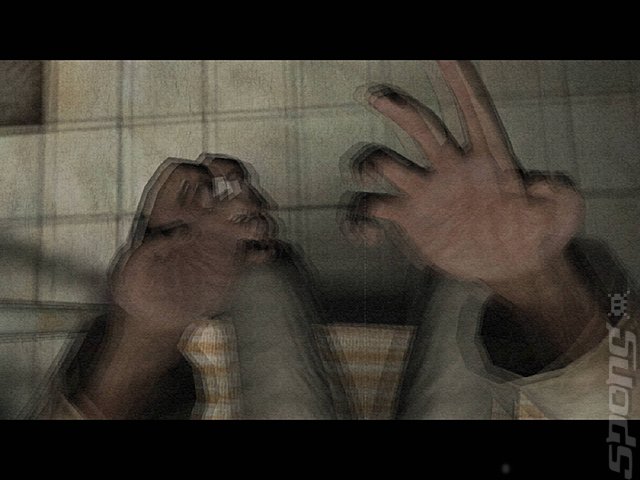 |
Vertigo~ |
Although a FPS, the character's damage that was focusd on each limb would affect gameplay via movement, camera view and health from all manner of injuries. The character will limp bleed and black out. The damage shows here but is more visible in the pause menu where it shows your avatar.
If the character got too scared the camera would act as if in vertigo, the colour from the screen would sap into monochrome and you could feel his heartbeat in the vibration of the pad and hear it on-screen with his heavy breathing.
Subscribe to:
Posts (Atom)